
The Blood of Dawnwalker PC requirements go well beyond a basic minimum-and-recommended list. Bandai Namco published five hardware targets for native 1080p, 1440p, and 4K, each tied to a frame rate and graphics preset. Every tier requires 16 GB of RAM, Windows 10 with DirectX 12, and 60 GB on an SSD. The major differences are GPU power and VRAM.
The Blood of Dawnwalker system requirements at a glance
Minimum — native 1080p, 30 FPS, Low: Intel Core i7-8700K or AMD Ryzen 7 3700X; NVIDIA RTX 3050 or GTX 1070, AMD RX Vega 56, or Intel Arc A580; 6 GB VRAM.
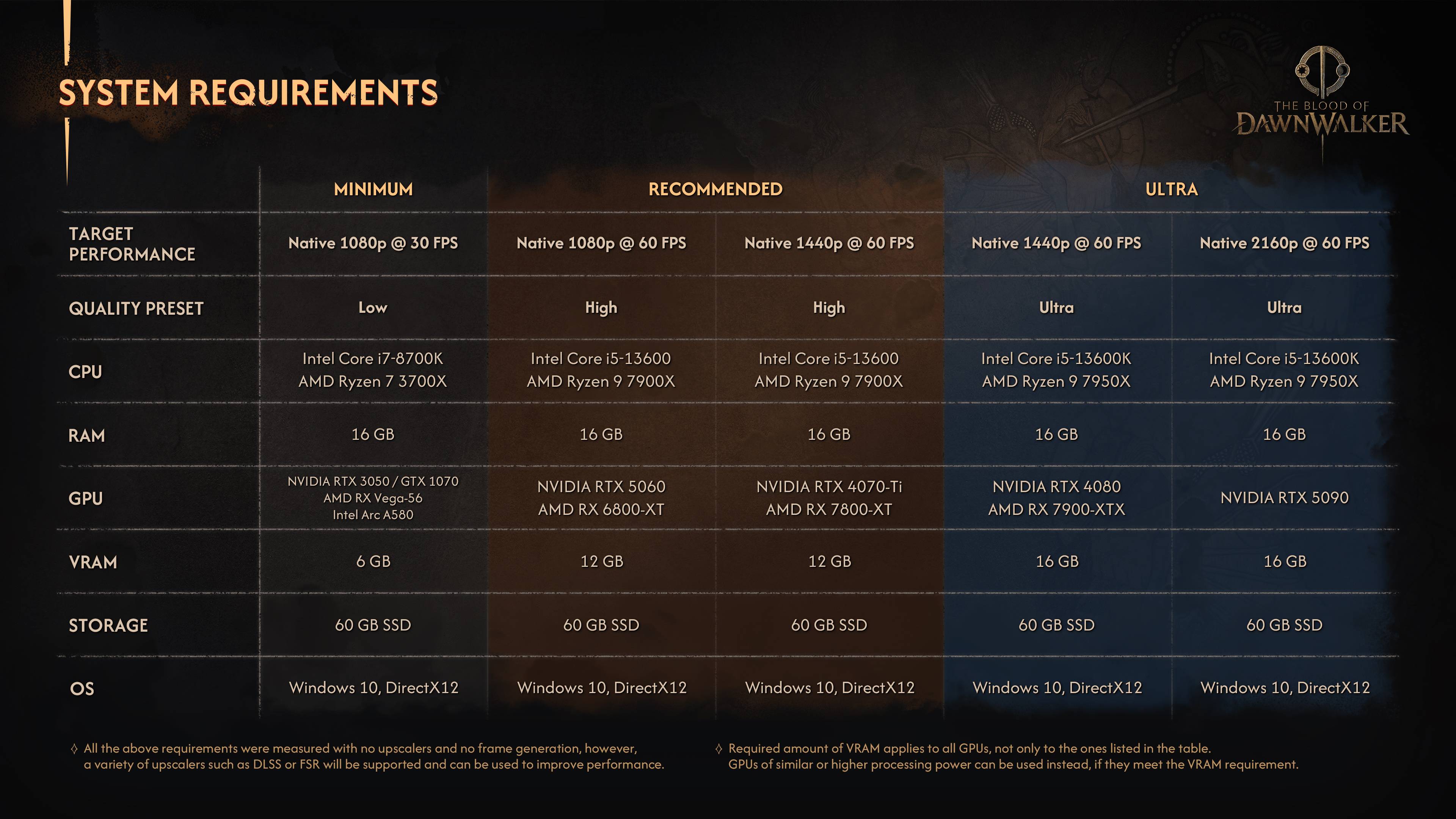
Recommended 1080p — native 1080p, 60 FPS, High: Intel Core i5-13600 or AMD Ryzen 9 7900X; NVIDIA RTX 5060 or AMD RX 6800 XT; 12 GB VRAM.
Recommended 1440p — native 1440p, 60 FPS, High: Intel Core i5-13600 or AMD Ryzen 9 7900X; NVIDIA RTX 4070 Ti or AMD RX 7800 XT; 12 GB VRAM.
Ultra 1440p — native 1440p, 60 FPS, Ultra: Intel Core i5-13600K or AMD Ryzen 9 7950X; NVIDIA RTX 4080 or AMD RX 7900 XTX; 16 GB VRAM.
Ultra 4K — native 2160p, 60 FPS, Ultra: Intel Core i5-13600K or AMD Ryzen 9 7950X; NVIDIA RTX 5090; 16 GB VRAM.
Pick the right tier for your PC
Start with your monitor and frame-rate target, then compare your CPU and GPU. There is little reason to budget around the 1440p or 4K columns for a 1080p display. If 30 FPS on Low works for you, the minimum column is the baseline. For 60 FPS at 1080p on High, use the first recommended column rather than treating “recommended” as a catch-all setting.
The GPU jump between 1080p High and 1440p High is the clearest dividing line. The CPU and 12 GB VRAM requirement stay the same, but NVIDIA’s target moves from an RTX 5060 to an RTX 4070 Ti, while AMD’s moves from an RX 6800 XT to an RX 7800 XT. Compare your PC with the 1440p column if that is your intended resolution.
Ultra settings raise the VRAM requirement to 16 GB. The 1440p Ultra target lists an RTX 4080 or RX 7900 XTX, while native 4K at 60 FPS lists only an RTX 5090. A newer GPU model is not automatically a match for a higher tier; its performance class and available VRAM still matter.

Upscaling, frame generation, and VRAM
The targets were measured without upscaling or frame generation. Bandai Namco says DLSS or FSR may improve performance, but it does not provide separate targets for those modes. The five columns are native-resolution reference points, not benchmark guarantees for every scene or hardware combination.

Pay close attention to the VRAM row. The publisher says each figure applies to all GPUs, not just the listed examples, and warns that cards below the specified amount may show graphical artifacts. System RAM is simpler: every tier lists 16 GB.
Why Steam lists different PC requirements
Steam currently uses a simplified two-tier list without resolution, frame-rate, or preset targets. Its minimum is a Core i5-11400F or Ryzen 7 2700X with a GTX 1060 or RX 580 and 6 GB VRAM. Its recommended entry is a Core i7-11700K or Ryzen 7 5700X with an RTX 4060, RX 7600 XT, or Arc B580 and 8 GB VRAM.
Use the five-column publisher chart for a resolution-and-FPS decision because it defines the workload. Treat the Steam page as the current storefront baseline. The lists are not directly interchangeable, so Steam’s “recommended” entry should not be read as a promise of native 1080p at 60 FPS on High.
Storage and pre-purchase checklist
Reserve at least 60 GB on an SSD. Before buying, check four things in order: target resolution, desired frame rate, GPU and VRAM, then CPU. If one component falls below your chosen column, lower the target or wait for testing on similar hardware instead of assuming upscaling will close the gap.

Sources:
Bandai Namco detailed PC system requirements: https://en.bandainamcoent.eu/dawnwalker/news/the-blood-of-dawnwalker-will-launch-september-3-rebel-wolves-revealed-key-details
Steam storefront requirements: https://store.steampowered.com/app/3751260/The_Blood_of_Dawnwalker/
Bandai Namco launch announcement: https://en.bandainamcoent.eu/dawnwalker/news/the-blood-of-dawnwalker-now-available-pc-playstation-5-and-xbox-series-xs
0 개의 댓글:
댓글 쓰기